src.http_server package
Summary
This simulation investigates how a SoyutNet based load distribution performs compared to a plain asyncio socket server implemented by Uvicorn for different number of concurrent requesters.
The auto-generated PT net diagram is given below for 4 concurrent requesters. Let us denote the number of concurrent requesters by \(N\).
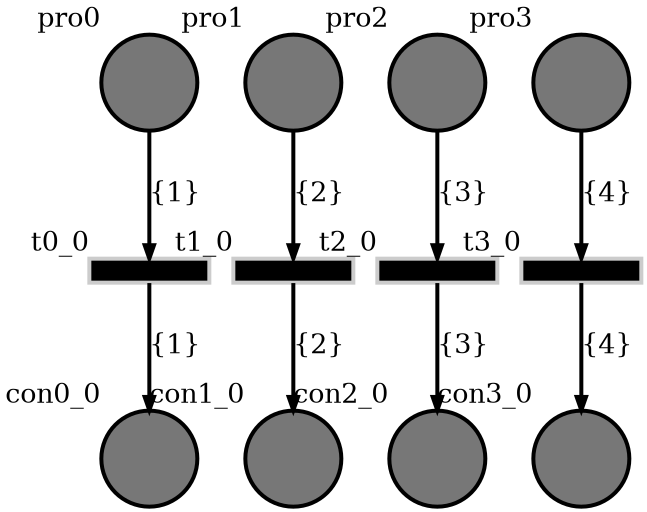
In the diagram,
pro0topro3are producers and requests are distributed to these producers.con0_0tocon3_0are consumers and reads requests data and writes response to the socket.It is assumed that, the processing time of each requests takes an amount of time distributed according to the normal distribution with mean, \(\mu\) and standard deviation \(\sigma\).
All arc labels are different. (\(\left\{1\right\}\) to \(\left\{N\right\}\))
In this simulation
\(\mu = 0.02 sec\)
\(\sigma = 0.001 sec\)
Each simulation starts an ab (server benchmarking tool) process which sends 4096 POST requests with 1024 byte request body size and varying number of concurrent requests.
System description
The only implementational difference between Uvicorn and this simulation is:
The asyncio task loop \(3N\) additional tasks added by SoyutNet.
Requests are handled after passing through 2
asyncio.Queues.
The whole implementation can be found at https://github.com/dmrokan/soyutnet-simulations/blob/main/src/http_server/main.py
Producer
In this case, the main asyncio loop starts a Uvicorn HTTP server.
208
209    uvicorn_server = [None]
210
211    async def canceller():
212        try:
213            ab_proc = psutil.Process(AB_PID)
214            while ab_proc.is_running() and ab_proc.status() != psutil.STATUS_ZOMBIE:
215                await asyncio.sleep(1)
216        except psutil.NoSuchProcess:
217            pass
218        await asyncio.sleep(1)
219        if uvicorn_server[0] is not None:
220            await uvicorn_server[0].shutdown()
221        soyutnet.terminate()
222
223    """Automatically terminate after ab ends"""
224
225    soyutnet.run(
226        reg,
227        extra_routines=[
228            uvicorn_main.main(
229                uvicorn_app, HOST, PORT, canceller, uvicorn_server, CONCURRENT_REQUESTS
230            )
231        ],
232    )
233    """Start simulation"""
234
The canceller task waits for benchmarking tool to be completed by checking its process status
using psutil library. Then, it ends the simulation.
A new token is generated when the HTTP server receives a request. The request data is binded to the token.
105
106    LABEL_MAX = CONCURRENT_REQUESTS
107
108    label_counter = 0
109
110    def new_label():
111        nonlocal label_counter
112        label_counter %= LABEL_MAX
113        label_counter += 1
114        """Assign a label from 1 to LABEL_MAX to determine the path it will follow in the net."""
115        return label_counter
116
117    def new_http_request_token(scope, receive, send, cond):
118        label = new_label()
119        token = net.Token(label=label, binding=(scope, receive, send, cond))
120        treg.register(token)
121
122        return (token._label, token._id)
123
124    async def uvicorn_app(scope, receive, send):
125        if scope["type"] != "http":
126            return
127        cond = asyncio.Semaphore(value=0)
128        token = new_http_request_token(scope, receive, send, cond)
129        label = token[0]
130        req_queues[(label - 1) // BRANCH_COUNT].put_nowait(token)
131        await cond.acquire()
132        """Wait until endpoint fullfills HTTP request"""
133
134    async def producer(place):
135        index = int(place._name[3:])
136        token = await req_queues[index].get()
137        return [token]
138
139    """Inject token"""
140
Then, the token is injected to the PT net. However, only the label and ID of token
travels through the net. The binded object is registered in the soyutnet.SoyutNet.TokenRegistry.
Consumers
Similar to the PI Controller simulation, consumers \(e_1\) and \(e_2\) receive tokens as a label and ID. Then they convert it to the actual token as given below.
146
147    async def consumer(place):
148        async def http_server(uvicorn_scope, uvicorn_receive, uvicorn_send):
149            await uvicorn_main.app(uvicorn_scope, uvicorn_receive, uvicorn_send)
150
151        nonlocal consumer_stats
152        t0 = time.time()
153        ident = place.ident()
154        if ident not in consumer_stats:
155            """Initialize stats at first call of the producer."""
156            consumer_stats[ident] = {"started_at": time.time(), "count": 0}
157            """Store initial time and number of requests processed to calculate requests per second."""
158
159        label = place._input_arcs[0]._labels[0]
160        token = place.get_token(label)
161        T = time.time()
162        if not token:
163            consumer_stats[ident]["last_at"] = time.time()
164            return
165
166        actual_token = treg.pop_entry(*token)
167        """Get actual SoyutNet.Token object from SoyutNet.TokenRegistry"""
168        if actual_token is None:
169            consumer_stats[ident]["last_at"] = time.time()
170            return
171
172        uvicorn_scope, uvicorn_receive, uvicorn_send, cond = actual_token.get_binding()
173        """Get object binded to the actual token"""
174        await http_server(uvicorn_scope, uvicorn_receive, uvicorn_send)
175        """Fulfill the request."""
176        cond.release()
177        """Inform uvicorn_app that request is replied"""
178
179        consumer_stats[ident]["count"] += 1
180        consumer_stats[ident]["last_at"] = time.time()
181
The Uvicorn application’s implementation is in https://github.com/dmrokan/soyutnet-simulations/blob/main/src/http_server/uvicorn_main.py
Controllers
SN
The only implementational difference between Uvicorn and this simulation is:
The asyncio task loop \(3N\) additional tasks added by SoyutNet.
Requests are handled after passing through 2
asyncio.Queues.
UV
This is a plain Uvicorn HTTP echo server which is implemented to compare the results to SN.
Results
It is assumed that, the processing time of servers are modeled by a normal random variable with an average processing delay of 0.02 seconds (50Hz) and standard deviation if 0.001 seconds.
Each simulation starts an ab (server benchmarking tool) process which sends 4096 POST requests with 1024 byte request body size and varying number of concurrent requests.
ab tool can save the results in CSV file with the structure below.
Percentage served,Time in ms
0,5.614
1,6.456
2,6.487
3,6.529
4,6.612
5,6.646
6,6.664
For example 5th line show that, 4% of requests replied in less than 6.65 milliseconds.
In summary, the same simulation run for three different controllers and several different number of concurrent requests and CSV files are obtained.
The figure below plots the columns of CSV files. The x axis shows the data in the second column of the CSV format given above. The y axis shows the first column divided by 100.
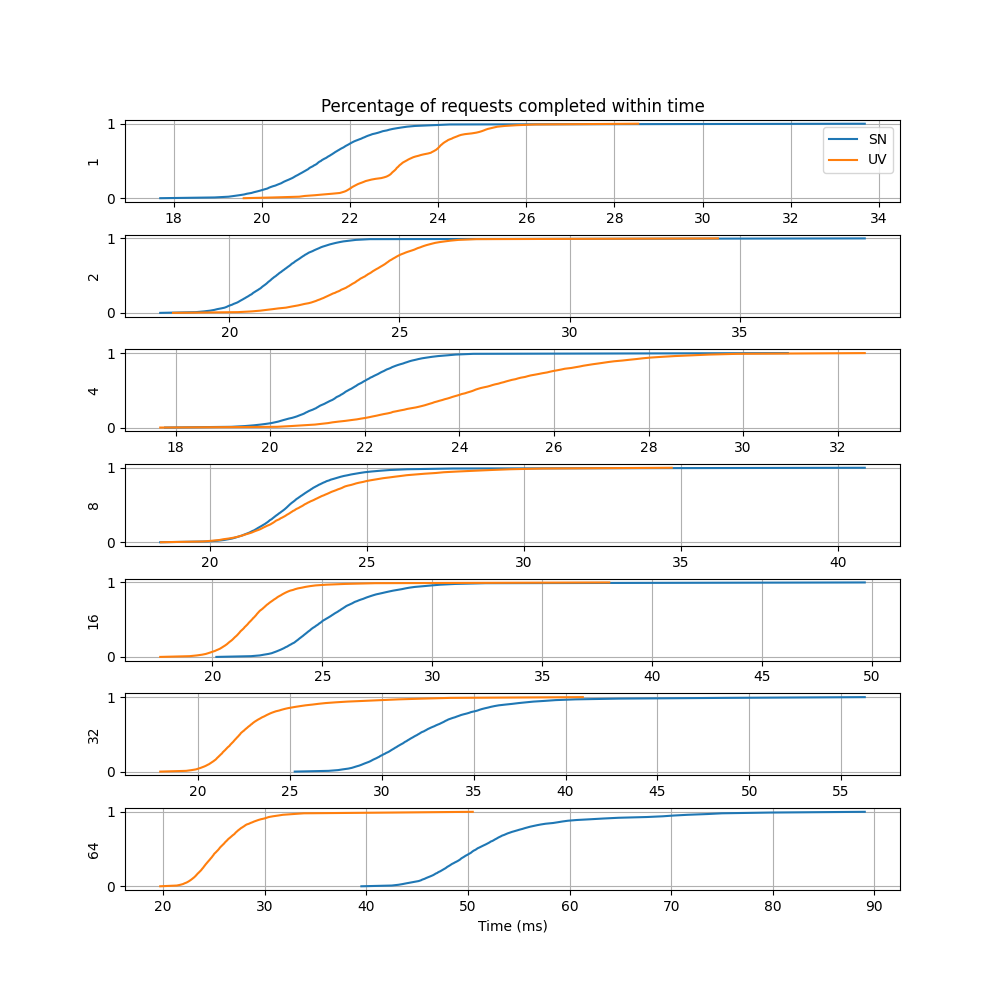
The plot resembles a cumulative normal distrbution. When the numerical derivate of y axis data is taken with respect to x axis data, the plots below is obtained for different number of concurrent requests.
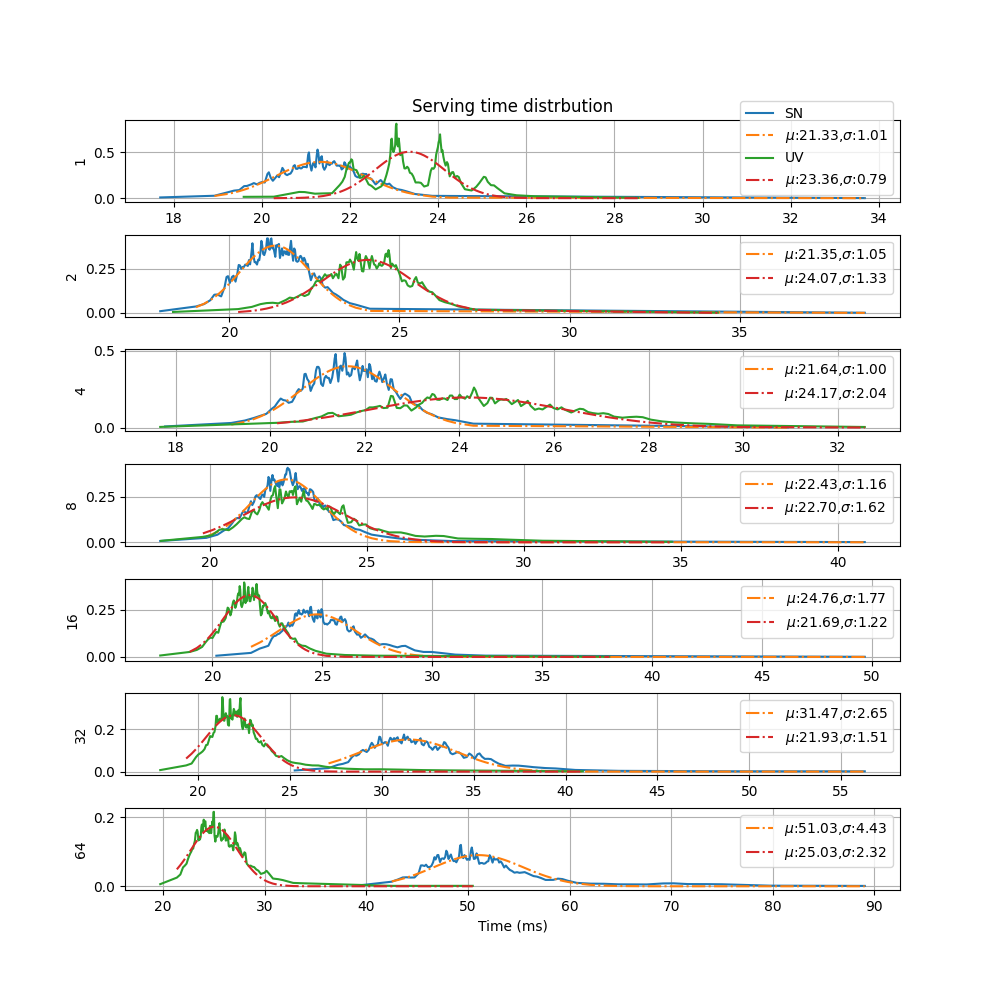
The x axis is time and the y axis is time distrbution for different number of concurrent requests. The integer values on the left of plots show the number of concurrent requests. As the number of concurrent requests increases, the average serving time increases.
Also, a gaussian is fit on the data by using the gradient decent solution to the nonlinear least squares problem. The plot labels shows the mean (\(\mu\)) and standard deviation (\(\sigma\)) of the gaussion function which fits the data.
Reproduce
sudo apt install python3-venv apache2-utils
python3 -m venv venv
source venv/bin/activate

make build
make build=http_server
make clean=http_server
make run=http_server
make results=http_server
make graph=http_server
make docs
Usage
Submodules
src.http_server.main module
- src.http_server.main.USAGE()
Arguments:
- -T <time (sec)>
total simulation time in seconds (\(T\))
Default: 10
- -o <filename>
output file name to write results. If empty, prints to stdout.
- -p <rate (Hz)>
new token output rate of the producer at each second
Default: 10
- -H hostname
Default: 127.0.0.1
- -P port
Default: 5000
- -G
if provided, the script generates PT net graph and exits
-A ab command’s PID
-C number of concurrent requests expected
- Example
python src/http_balancer/main.py -p 100
src.http_server.results module
- src.http_server.results.fit_gaussian(x, pdf)
- src.http_server.results.load_results()
- src.http_server.results.main(argv)
- src.http_server.results.plot_results(results)
src.http_server.uvicorn_main module
- async src.http_server.uvicorn_main.app(scope, receive, send, mean=0.02, std=0.001)
Echo the request body back in an HTTP response.
- async src.http_server.uvicorn_main.main(app_, host, port, canceller, server_ref, concurrent_requesters)
- src.http_server.uvicorn_main.server_main(args)

Comments
SN has a distribution which very closely matches the artifical delay in the HTTP request/response loop. But, it gets slower as the number of concurrent requesters goes beyond 8.
[Work in progress]